Story Mode
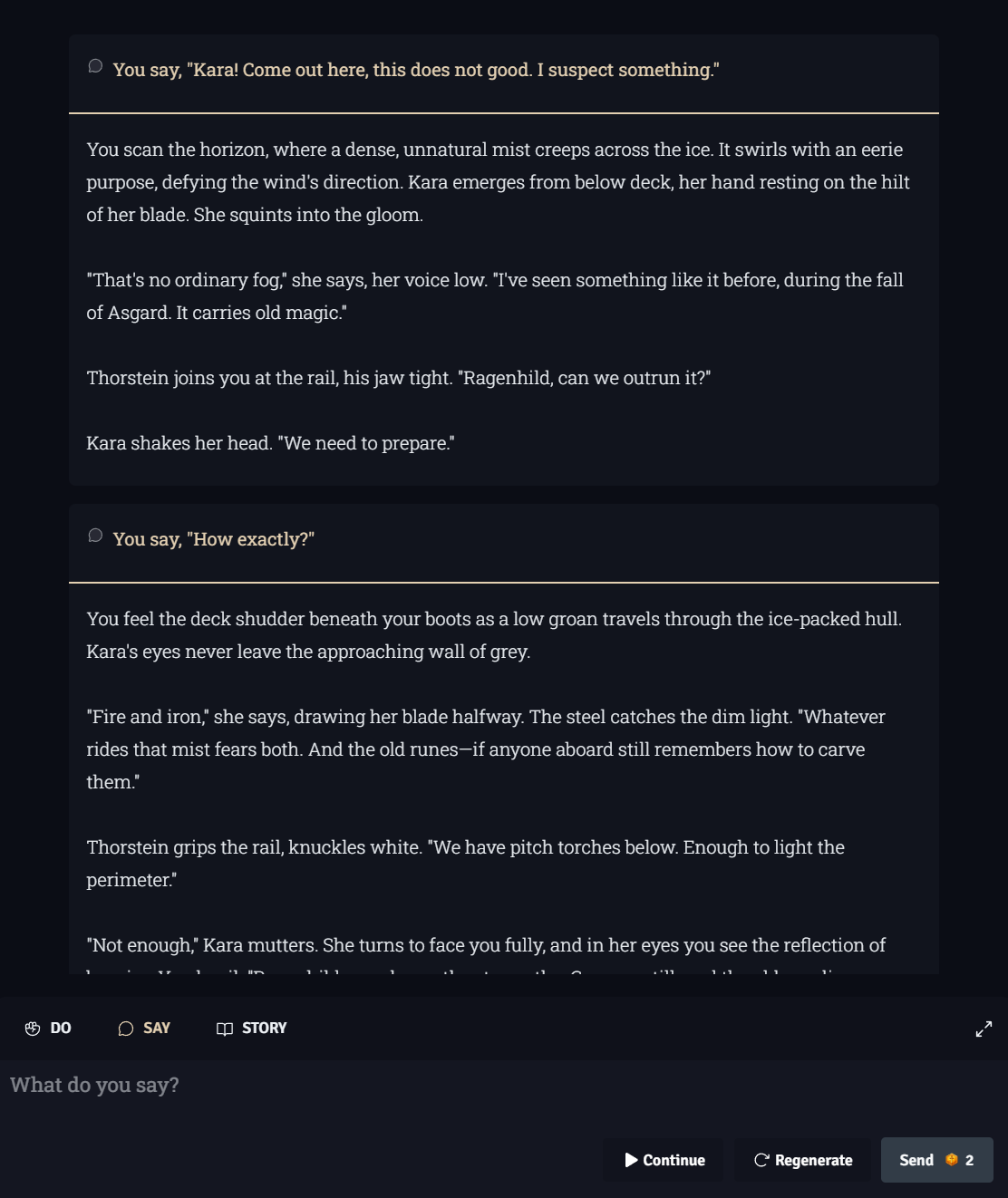
Story Mode is Isekaigen’s pure narrative experience. There are no stats, no XP bar, no quests, and no relationship scores — just you, a world, and an AI that responds to everything you write with rich, immersive prose.
What Story Mode is for
Section titled “What Story Mode is for”Story Mode is ideal when you want to:
- Focus entirely on the writing without RPG mechanics pulling your attention
- Explore a world’s lore and characters without worrying about failing quest stages
- Write a specific kind of story that doesn’t fit neatly into a quest format
- Test a world you’re building to see how the AI responds to different prompts
Story Mode still has a full Lore Book, location tracker, NPC roster, Memory System, and Plot Builder — the backbone of a coherent long-form story is there. What’s removed is everything mechanical (stats, XP, combat turns).
Playing Story Mode
Section titled “Playing Story Mode”The loop is simple:
- Read the AI’s continuation of your story
- Type what your character does, says, or thinks
- Press Enter to submit
Your input can be as short as "walk into the tavern" or as elaborate as a full paragraph of narrated action. The AI adapts to your style.
💡 Tip: The AI writes in second person by default (“You step forward…”). Add a Writing Instruction like “Write in third person, past tense” if you prefer.
Writing Instructions
Section titled “Writing Instructions”Writing Instructions are a free-text field in your game settings where you can give the AI direct style guidance. Examples:
"Keep each response under 5 sentences.""Write in a literary, lyrical style with rich metaphors.""Use dialogue tags. Show, don't tell.""Write as if narrating a shounen manga."
Writing instructions are applied to every single response for the life of your game.
Writing Modules
Section titled “Writing Modules”Modules set the thematic lens through which the AI interprets your story:
| Module | What it does |
|---|---|
| Angel | Steers toward hope, redemption, and light even in dark settings |
| Devil | Leans into moral ambiguity, temptation, and darker consequences |
| Cupid | Amplifies romantic tension and emotional relationships |
| Phantom | Creates mystery, atmosphere, and a gothic sense of the uncanny |
| Sherlock | Frames events as puzzles; rewards investigation and deduction |
Modules work alongside your Writing Instructions — they complement each other rather than override.
Theater Mode
Section titled “Theater Mode”Theater Mode transforms your game into a cinematic slideshow. Instead of a scrolling text feed, each story turn is displayed as a full-screen panel. Activate it via the camera icon in the game toolbar.
Theater Mode is especially effective with location image generation enabled — every new place your character discovers gets its own generated artwork.
Lore Book
Section titled “Lore Book”The Lore Book is a persistent reference document inside your game. Add entries for important things — people, places, organizations, artifacts, rules of magic. Lore entries are retrieved contextually alongside memories each turn.
Access the Lore Book via the Book icon in the toolbar.
Memory System
Section titled “Memory System”Story Mode has full access to the Memory System. Important events are automatically captured as long-term memories and retrieved each turn based on relevance — keeping your story coherent even over hundreds of turns.
Full Memory System documentation →
Plot Builder
Section titled “Plot Builder”When enabled, the Plot Builder generates a narrative arc before each new chapter, ensuring the story always has direction. It uses your retrieved memories, lore, and writing module to make the arc feel relevant to your specific game.
Full Plot Builder documentation →
Story Mode vs RPG Mode — Quick comparison
Section titled “Story Mode vs RPG Mode — Quick comparison”| Feature | Story Mode | RPG Mode |
|---|---|---|
| AI narrative responses | ✅ | ✅ |
| Memory System | ✅ | ✅ |
| Lore Book | ✅ | ✅ |
| Location tracker | ✅ | ✅ |
| NPC roster | ✅ | ✅ |
| Plot Builder | ✅ | ✅ |
| Theater Mode | ✅ | ✅ |
| Image generation | ✅ | ✅ |
| Stats & leveling | — | ✅ |
| Quest system | — | ✅ |
| Relationship scores | — | ✅ |
| Battle system | — | ✅ |