Quests
Quests are RPG Mode’s structured goal system. Instead of drifting through a world aimlessly, quests give your character a concrete objective broken into named stages that you complete through roleplay. They are fully AI-generated, aware of your world’s lore and NPCs, and tracked in real time.
How quests work
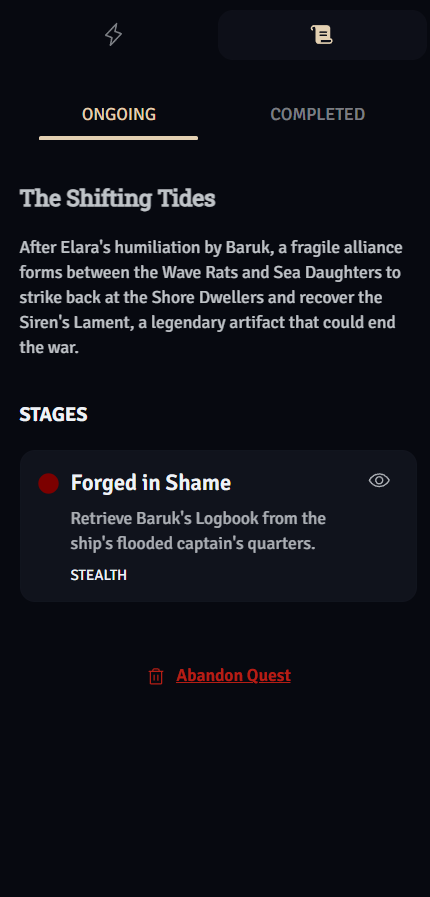
Section titled “How quests work”Quests are generated on demand and then activated by you. Each quest has:
- A name and description explaining the overarching goal
- 2–5 stages, each with its own objective type and completion condition
- A status that updates as you progress through roleplay
Only one quest can be active at a time. You must complete or abandon your current quest before starting a new one.
Generating a quest
Section titled “Generating a quest”Open the Quest tab (📜) in the RPG sidebar and click “Search for a Quest”.
Wanderer (Free) tier
Section titled “Wanderer (Free) tier”Wanderer accounts receive a randomly generated quest tailored to your current world and story context. The AI picks something fitting based on where you are and who you’ve met.
Adventurer, Hero, and Champion tiers
Section titled “Adventurer, Hero, and Champion tiers”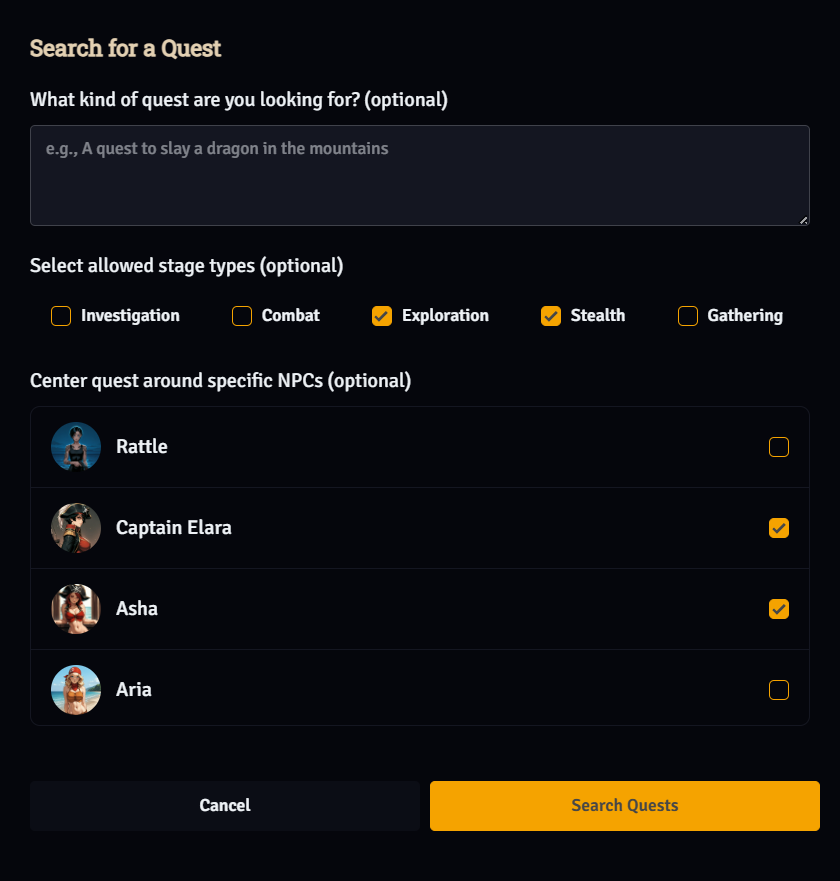
Higher-tier accounts get full quest customization:
- Prompt — Describe the quest you want:
"A quest to infiltrate the demon queen's palace" - Stage types — Choose which types of stages are allowed
- Center around NPCs — Select specific characters from your roster; the AI writes the quest around them
Quest generation costs credits.
Stage types
Section titled “Stage types”Every quest stage has a type that tells both you and the AI what kind of activity to focus on:
| Type | What it means |
|---|---|
| Investigation | Gather information, question witnesses, uncover hidden truths |
| Combat | Defeat enemies, survive an ambush, protect someone |
| Exploration | Navigate to a place, chart unknown territory, find a hidden area |
| Stealth | Infiltrate undetected, avoid guards, move without alerting anyone |
| Gathering | Collect specific items, resources, or evidence |
When generating a quest with tier customization, you can select which types are allowed. If you prefer non-combat stories, simply deselect Combat.
Stage statuses
Section titled “Stage statuses”| Status | Meaning |
|---|---|
| Ongoing | Your current active stage — focus here |
| Incomplete | Stage hasn’t been attempted yet |
| Completed | Stage successfully finished |
| Interrupted | Stage was disrupted; may be resolved or bypassed |
Completing stages through roleplay
Section titled “Completing stages through roleplay”Stages are completed through your actions in the story — there is no separate “complete stage” button. The AI monitors your story context each turn and recognizes when you’ve fulfilled a stage’s completion condition.
For example, if a stage says “Investigate the ruins of Ashenvale and discover who destroyed it”, the AI will mark the stage complete once your character has investigated and learned the answer in the narrative. A completion message appears in your story feed and the sidebar updates automatically.
💡 Tip: You can reveal a stage’s completion condition by clicking the eye icon next to it in the Quest panel. Use this to understand exactly what the AI is looking for.
Completing a quest
Section titled “Completing a quest”When the final stage is done, the quest moves to Completed status and you receive an XP reward plus a narrative summary of what your character accomplished. Completed quests appear in the Completed tab of the Quest panel for reference.
Abandoning a quest
Section titled “Abandoning a quest”Use the Abandon Quest button in the Quest tab if you want to walk away. You’ll be asked to confirm.
⚠️ Caution: Abandoning a quest is permanent — there is no way to resume it.
Quest tips
Section titled “Quest tips”- Be specific in your prompt. “A quest involving the Shadow Faction” gives better results than “a quest.”
- Center quests on NPCs you’ve already met. The AI writes richer quests when it can reference characters with established history in your story.
- Match stage types to your playstyle. If you dislike combat, filter it out when generating.
- Read completion conditions before accepting. Use the reveal button on each stage so you know what’s expected before you commit.