Manual World Builder
The Manual World Builder gives you complete control over every element of your world. While the AI World Builder is faster, the manual path lets you precisely specify lore, mechanics, character personalities, and the exact attacks your characters can use.
Overview of a world’s structure
Section titled “Overview of a world’s structure”Before building, it helps to understand how Isekaigen worlds are structured. The hierarchy is:
World└── Power System(s) └── Attacks / Abilities └── Factions ← each faction links to a power system └── Classes ← optional; each class gets a subset of attacks └── Characters ← assigned to a faction and optionally a classA character’s available abilities depend entirely on their class and faction, which depend on the power system.
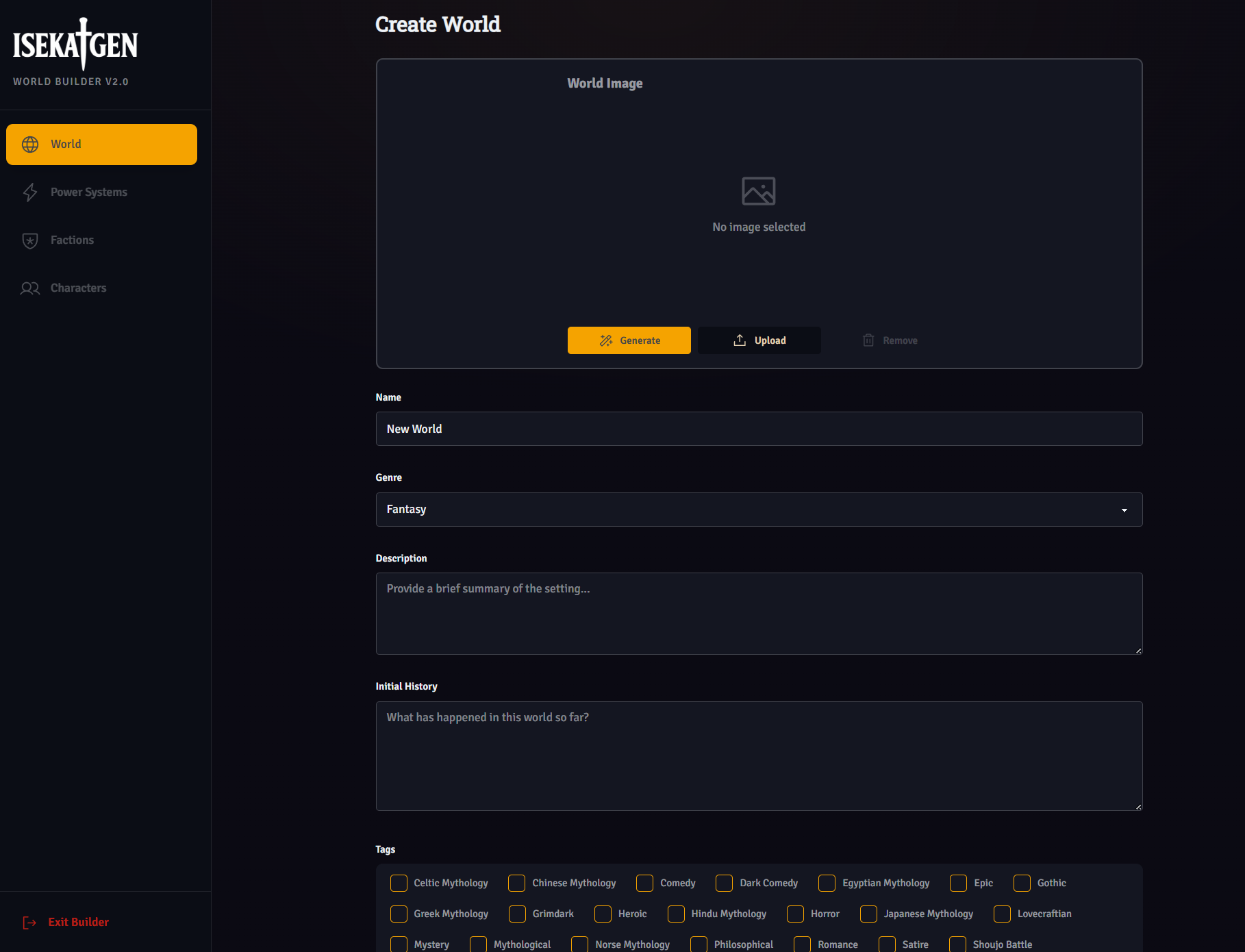
Step 1 — World basics
Section titled “Step 1 — World basics”Up to 30 characters. Keep it evocative and concise.
Description
Section titled “Description”Up to 400 characters. This is the public-facing blurb shown in the world browser. Write it as a hook.
Choose from 16 genres: Fantasy, Sci-Fi, Modern, Post-Apocalyptic, Dungeon, Xianxia, Wuxia, Cyberpunk, Steampunk, Superhero, Victorian Era, Prehistoric, Space Opera, Urban Fantasy, Parallel Universe, Alternate History.
Add tags to describe your world’s themes: Grimdark, Gothic, Horror, Romance, Comedy, Dark Comedy, Tragedy, Heroic, Mystery, Epic, Lovecraftian, Shounen/Shoujo Battle and Romance, and various mythology tags.
Initial History
Section titled “Initial History”The most important field — up to 600 characters of world lore. This text is included in every AI system message for every game played in your world. Write it like a condensed encyclopedia entry:
- What happened in the world’s past
- The current state of the world
- Who holds power and why
- The central conflict driving events
💡 Tip: The Initial History is the AI’s primary reference for your world. Make every character count — give the AI specific, usable facts rather than generic descriptions.
Step 2 — Power Systems
Section titled “Step 2 — Power Systems”A power system defines the framework of abilities in your world. Every attack belongs to a power system.
- Name — Up to 50 characters (e.g., “Spirit Blade Arts”, “Demon Channeling”)
- Description — Up to 400 characters explaining how the power system works
You can create 1 or 2 power systems per world. Most worlds have one. Multiple power systems allow fundamentally different ability types for different factions.
Step 3 — Attacks
Section titled “Step 3 — Attacks”Attacks are the individual abilities characters can use. Every attack belongs to a power system.
| Field | Options |
|---|---|
| Name | Up to 100 characters |
| Type | Melee or Projectile |
| Effect | None, Burn, Freeze, Poison, Shock, Bleed, or Stun |
| Damage | Numerical value |
| Stamina Cost | Stamina required to use |
| Level | Minimum level required |
| AoE | Area of effect (1 = single target) |
| Description | Narrative description of the attack |
📝 Note: The Level field restricts which characters can use an attack based on their current game level. Plan your attack roster with progression in mind.
Step 4 — Factions
Section titled “Step 4 — Factions”Factions are the political, cultural, or organizational groups that divide your world. Every character belongs to a faction.
- Name — Up to 50 characters
- Description — Up to 400 characters
- Power System — Which power system this faction uses
- Image — Optional faction banner or logo
How attacks work with factions
Section titled “How attacks work with factions”If a faction has no classes, every character in that faction can use all attacks from the faction’s power system.
If a faction has at least one class, characters must belong to a class and can only use the attacks assigned to their class.
Step 5 — Classes (Optional)
Section titled “Step 5 — Classes (Optional)”Classes are optional sub-groups within a faction that give different characters within the same faction different ability loadouts.
For example, a warrior faction might have:
- Sentinel class — heavy melee attacks, high AoE
- Blade Dancer class — fast single-target attacks
- Battle Priest class — support abilities plus one offensive attack
Class rules
Section titled “Class rules”- A class’s attacks must be a subset of its faction’s power system attacks — you cannot assign attacks from a different power system
- Once a class exists in a faction, all characters in that faction should be assigned to a class
Class fields
Section titled “Class fields”- Name — Up to 100 characters
- Description — Narrative description of the class
- Faction — Which faction this class belongs to
- Attacks — Multi-select from the faction’s power system attacks
- Image — Optional class image
Step 6 — Characters
Section titled “Step 6 — Characters”Characters are the playable protagonists your world offers. At least one is required (the default main character).
| Field | Details |
|---|---|
| Name | Up to 50 characters |
| Gender | Male, Female, Other |
| Background | Up to 600 characters — history, origin, motivations |
| Personality | Up to 600 characters — how the character thinks and speaks |
| Faction | Which faction they belong to |
| Class | Which class (optional if faction has no classes) |
| Image | Portrait image |
| Starting Text | The opening scene shown when someone starts a game with this character |
Personality traits (slider mode)
Section titled “Personality traits (slider mode)”Instead of writing personality as text, you can set 7 numerical trait values:
- Wisdom, Generosity, Integrity, Empathy, Courage, Temperance, Influence
These feed directly into the Personality Compatibility system. Text mode and slider mode can be used together — they complement each other.
Quirks
Section titled “Quirks”Add short descriptive tags that further define a character for the AI. Examples: “Speaks in riddles”, “Never shows fear”, “Secretly kind despite a rough exterior.”
Step 7 — Set the default character
Section titled “Step 7 — Set the default character”Designate one character as the default main character in world settings. This is what players see first when they open your world’s page. Make it your most compelling protagonist.
Publishing
Section titled “Publishing”Toggle Public in world settings when your world is ready. Your world will appear in the Isekaigen world browser. You can make it private again at any time.
Tips for a great world
Section titled “Tips for a great world”- Write the Initial History last. Once you know all your factions and characters, you’ll write better lore.
- Keep attack names thematic. “Shadow Step Slash” is more immersive than “Attack 3” — the AI uses attack names in combat narration.
- Give each character a distinct starting text. The opening scene is the first thing a player reads — make it grab them.
- Use personality sliders alongside text. Sliders handle the mechanical compatibility system; text handles nuance the sliders can’t capture.
- Test before publishing. Start a game in your own world in both Story and RPG modes. Adjust the Initial History based on how the AI responds.