RPG Mode
RPG Mode transforms Isekaigen from a narrative tool into a fully featured text RPG. Your character has measurable stats that affect how the AI resolves situations, gains XP and levels, and tracks relationships with every NPC they meet.
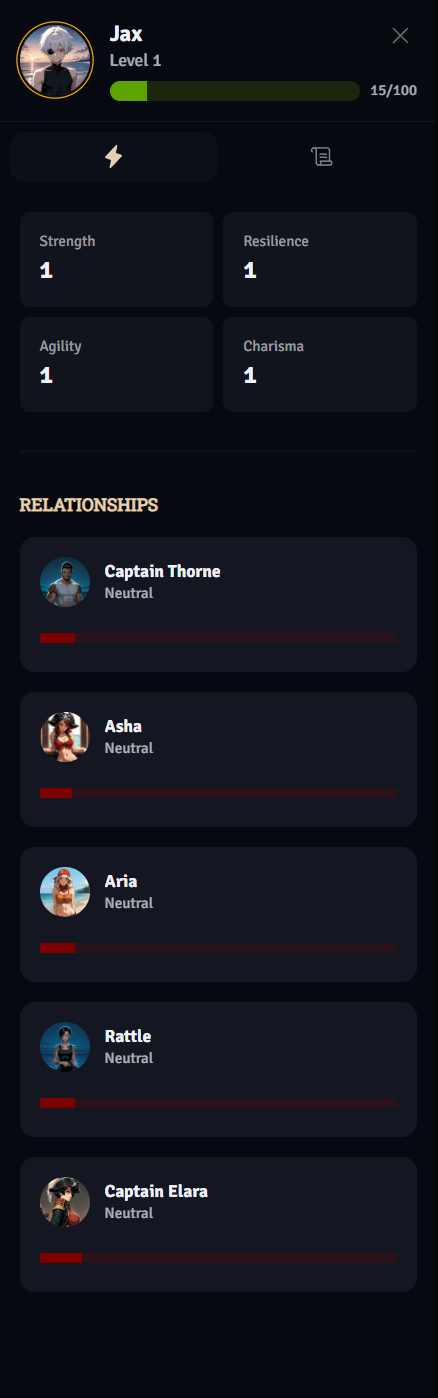
Every RPG Mode character has four core stats, each starting at 1. Stats influence the AI’s narrative outcomes — the higher a stat, the more likely actions in that domain are written as successful.
| Stat | Effect |
|---|---|
| Strength | Physical power — affects the damage of attacks |
| Resilience | Endurance — affects health how much punishment your character can take |
| Agility | Speed and precision — increases blocking chance in combat |
| Charisma | Social influence — increases relationship with all characters by 5 |
When you have Level Up Points available, a + button appears next to each stat in the sidebar so you can invest points immediately.
Allocate points to what you prefer. Someone having a combat heavy playthrough might prefer allocating points to Strength and Resiliene while another who focuses on relationships can increase charisma.
Experience & Leveling
Section titled “Experience & Leveling”You gain XP by completing actions, finishing quest stages, and winning battles. XP gains appear as notification messages in your story feed.
- 100 XP = 1 level
- The XP bar in the sidebar shows progress within your current level
- Each new level gives you 1 Level Up Point to spend on any stat
⚠️ Caution: Spending a Level Up Point is permanent. The confirmation modal will ask you to confirm before committing.
Writing Models
Section titled “Writing Models”RPG Mode supports different AI writing models:
| Model | Speed | Cost |
|---|---|---|
| Agent Flash | Fast | Low |
| Agent | Slower, highest quality | Higher |
💡 Tip: Agent Flash is the default and works great for most players. Use Agent when you want the highest narrative quality.
Writing Modules
Section titled “Writing Modules”Writing Modules set the narrative tone of your story:
| Module | Tone |
|---|---|
| Angel | Hopeful, redemptive, morally uplifting |
| Devil | Dark, manipulative, morally complex |
| Cupid | Romantic, emotional, relationship-focused |
| Phantom | Mysterious, atmospheric, gothic |
| Sherlock | Investigative, analytical, puzzle-driven |
Modules also feed into the Plot Builder — when active, the plot arc will match the chosen module’s theme.
Image Generation
Section titled “Image Generation”- Location images — Generated when your character enters a new named location
- Enemy images — Generated when you enter a battle
Both cost extra credits per image and can be toggled in game settings.
The RPG Sidebar
Section titled “The RPG Sidebar”The sidebar on the right side of the game screen is your control panel:
- Player header — Portrait, name, level, and XP progress bar
- Level Up Points — Shown when you have points to spend
- Two tabs:
- ⚡ Stats tab — Stat grid with level-up buttons + NPC relationships below
- 📜 Quest tab — Active quest, its stages, and completed quest history
The sidebar can be resized by dragging its left edge, or hidden entirely.
Battle System
Section titled “Battle System”When combat begins, the game switches to a structured turn-based system where you select attacks from your character’s available abilities — determined by their class and power system. Battle outcomes are influenced by your Strength and Agility stats.
📝 Note: Available attacks are defined by your character’s class within the world’s power system. If your character has no class, they can use all attacks from their faction’s power system.